¶ Exams, grades, and report cards
The grading pipeline has four stages:
Grading Scale  ─┐
                 ├→ Exam Types → Exams → Exam Results ┐
Course ─────────┘                                      │
                                                       ▼
                                            Report Card + PDF
- Grading scale defines the letter/GPA bands a percentage maps to.
- Exam type defines a class of assessment and its default weight.
- Exam is one concrete assessment tied to a course.
- Exam result is one student's score on that exam.
- Report card rolls up all the student's results for a term into a per-course weighted average and an overall GPA.
¶ Grading scales
School → Configuration → Grading Scales.
Two shipped with the demo: US Standard (A–F) (default) and Philippine DepEd (1.00 top, 5.00 bottom). You can add your own.
Each scale has bands — rows with:
| Field | Notes |
|---|---|
| Letter | The letter/mark shown on results (e.g. A, B+, 1.25). |
| Minimum % | Inclusive lower bound. The highest-matching band wins. |
| GPA Value | Numeric GPA for this letter. E.g. 4.0 for A. |
| Sequence | Display order in the form. |
Exactly one scale has is_default = True. That's the scale used whenever an exam doesn't override it.
¶ Exam types
School → Configuration → Exam Types. Shipped with: Quiz (default weight 20), Midterm Exam (30), Final Exam (50). Add custom types (e.g. Project, Homework Set) as needed. The weight on an exam type is just a default seeded onto new exams of that type — you can always override it per exam.
¶ Creating an exam
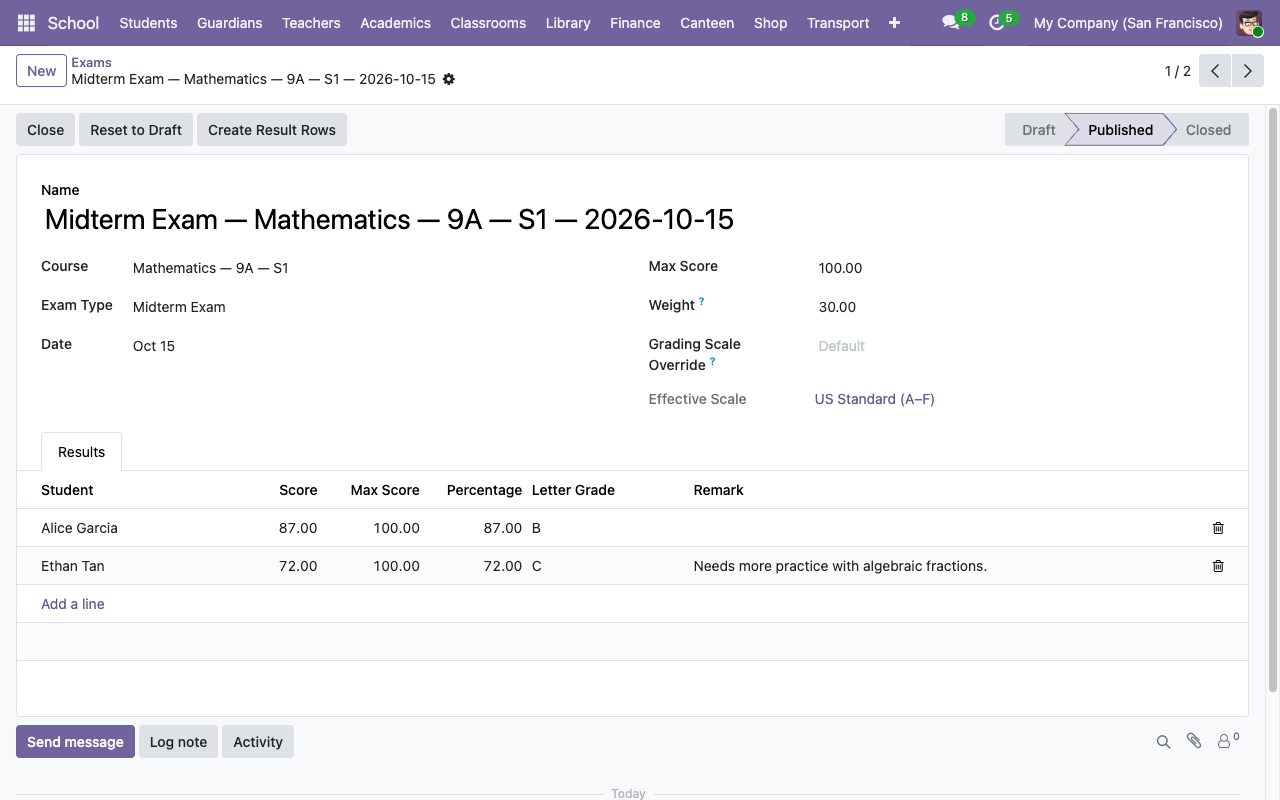
School → Academics → Exams → New.
| Field | Notes |
|---|---|
| Course | The exam belongs to one course. Determines who can be graded. |
| Exam Type | Seeds the default weight. |
| Date | When the exam happens. |
| Max Score | Denominator for percentage calc. Default 100. |
| Weight | This exam's contribution to the course's final grade, in percent. Seeded from the exam type; editable. |
| Grading Scale Override | Optional — if blank, the default scale is used. The Effective Scale field below shows which one will actually be applied. |
Save, then click Publish in the header. The state moves from draft to published, which is the state used by the report-card pipeline.
¶ Entering results
Two ways:
-
Bulk placeholders — on a published exam, click Create Result Rows. The system creates a blank row for every enrolled student with
score = 0. Teachers edit the scores afterward. -
Row-by-row — use the Results tab. Add lines one at a time.
Each result row fills in automatically:
- Percentage =
score / max_score × 100. - Letter Grade — looked up on the exam's effective scale.
- GPA Value — the matching band's GPA.
- Remark — free text, optional.
Safety nets:
- Score ∈
[0, max_score]— validation error otherwise. - The student must be enrolled in the exam's course.
- Unique
(exam, student)— no double scoring.
When you edit a score, the computed fields update live. No need to "save and recompute".
¶ Course grades and weighted averages
A student's grade in a course is computed on demand when their report card line for that course is built:
graded_results = student's results on course exams whose state is 'published' or 'closed' with weight > 0
if graded_results is empty  → line marked Incomplete
else:
    percentage = Σ(result.percentage × exam.weight) / Σ(exam.weight)
    letter_grade = scale.band_for_percentage(percentage).letter
    gpa_value   = that band's GPA
This is a weighted average — a midterm worth 30 and a quiz worth 20 end up contributing in 3:2 ratio to the final grade. Missing exam results don't penalize (they're skipped, not zeroed) unless you explicitly record a score of 0.
¶ Report cards
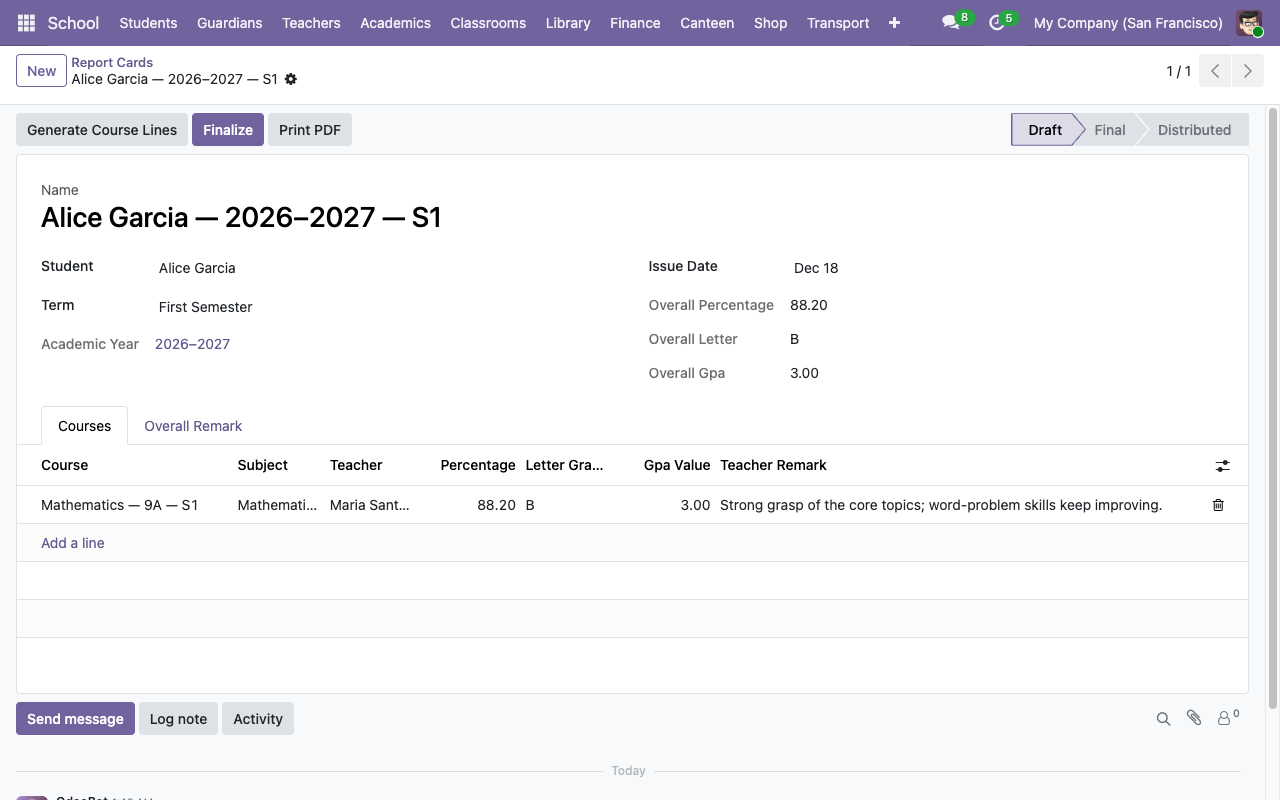
School → Academics → Report Cards → New.
| Field | Notes |
|---|---|
| Student | Required. Picker is filtered to is_student. |
| Term | Required. Determines which exams count. |
| Issue Date | Default today. |
| State | draft → final → distributed. |
Steps:
- Save the draft card.
- Click Generate Course Lines in the header. The system enumerates every course the student is enrolled in for that term and creates a line per course, with
percentage/letter_grade/gpa_value/is_incompletecomputed from the current exam results. - Add a teacher remark per course line if you want (free text).
- Add an overall teacher remark at the bottom if you want.
- Click Finalize to move the state to
finaland freeze the computation.
¶ Printing the PDF
Click Print PDF on the form header, or use Print → Report Card from the action menu. You get a single-page A4 PDF with:
- School name + logo from
res.company. - Student block (name, admission #, classroom).
- Term + academic year.
- Course table — subject | teacher | % | letter | GPA | remark.
- Overall footer — % / letter / GPA.
- Teacher remark (if set).
- Signature lines for Homeroom Teacher + Principal.