¶ Canteen — wallets and purchases
The canteen module gives every student a prepaid wallet, tracks top-ups and purchases, and refuses to let a student buy something they're allergic to.
¶ 1. Set up dietary tags
School → Configuration → Dietary Tags → New.
A dietary tag has a name (e.g. Contains Nuts), a short code (nuts), and a color. The same tag model is reused on both sides:
- On a canteen product: "this item contains X".
- On a student's profile: "this student is allergic to X".
When the sets intersect on a purchase, the system blocks it.
¶ 2. Flag canteen products
School → Configuration → Canteen Items → New.
A canteen product is a regular Odoo product flagged is_canteen_item = True. On the product form:
- Tick Is Canteen Item.
- Fill in Dietary Tags — what the product contains.
- Set Type to
Consumable(orProductif you want stock tracking). - Set the Sales Price.
Save.
¶ 3. Record student allergies
Open the student's record (School → Students → Alice), go to the Student Information tab, and fill in Canteen Allergies. This is a many-to-many picker against the dietary-tag catalog.
¶ 4. (Optional) Publish today's menu
School → Canteen → Daily Menus → New.
A menu has a date and a list of items. Set its state to Published and kids can see what's available. The menu is display-only — a student can buy any canteen product, not just ones on today's menu. (Schools that need the menu to be a hard gate can implement that via a constraint; out of scope for the base workflow.)
¶ 5. Create a wallet
School → Canteen → Wallets → New. Pick a student. Each student can have exactly one wallet (enforced by unique constraint).
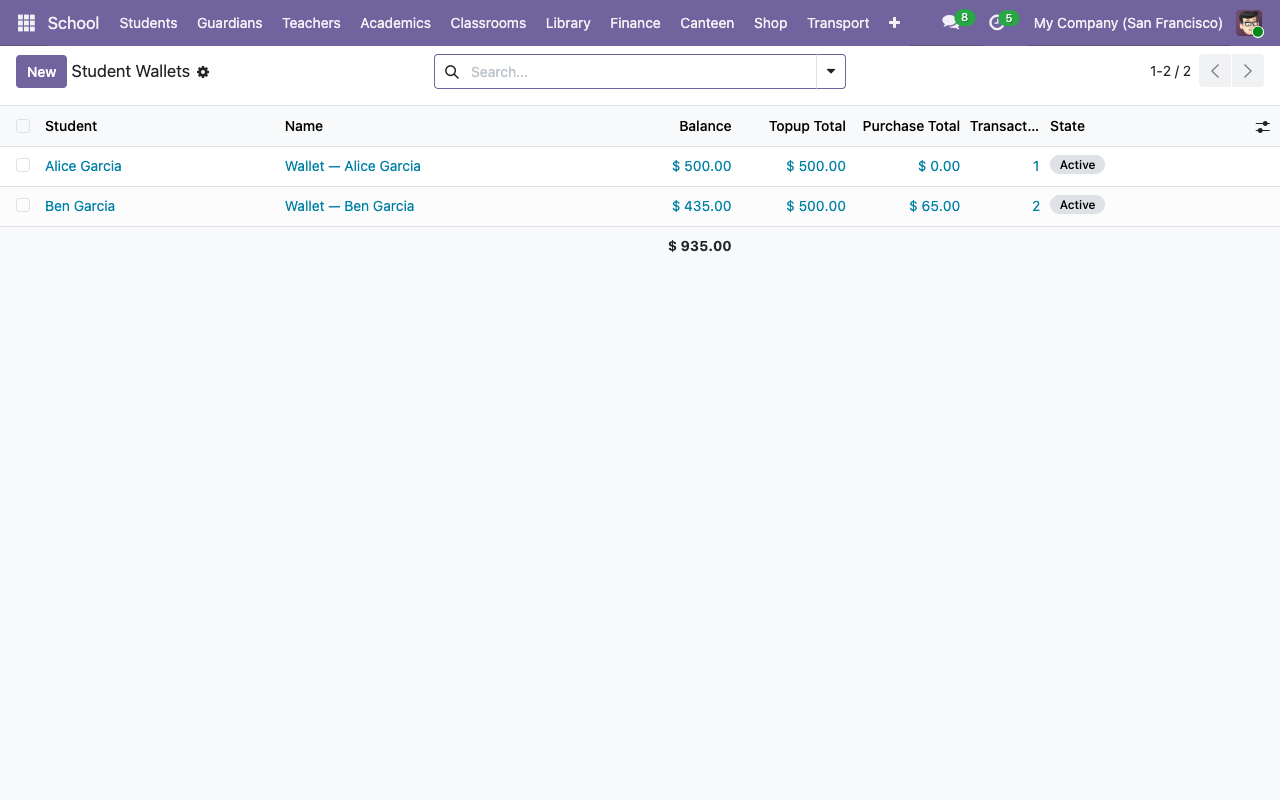
New wallet starts with balance 0.00 in the active state.
¶ 6. Top up the wallet
On the wallet form, go to the Transactions tab and click Add a line — or use School → Canteen → Transactions → New.
| Field | Notes |
|---|---|
| Wallet | Picks the student. |
| Type | Top-up. |
| Amount | What the parent is paying. |
| Method | Cash / Bank Transfer / Card / Other. |
| Description | Free text (e.g. "Initial top-up by parent"). |
Save the draft, then click Post in the header. Two things happen:
- Transaction state becomes
posted. - Wallet
balanceincreases byamount.
The wallet's rollups (Top-up Total, Purchase Total, Transaction Count) update live.
¶ 7. Record a purchase
Same transactions list, same New button.
| Field | Notes |
|---|---|
| Wallet | The buyer's. |
| Type | Purchase. |
| Items | Many-to-many picker of canteen products. |
| Method | Usually irrelevant for wallet-funded purchases. |
The Amount auto-computes from the sum of item list prices. Click Post:
-
Allergy check: Odoo intersects the student's
canteen_allergy_tag_idswith each item'scanteen_dietary_tag_ids. If the intersection is non-empty, aValidationErrorfires naming the offending items and the purchase is refused. -
Balance check: the wallet balance must be ≥ the purchase amount. Otherwise
UserError("Insufficient balance: wallet has X, purchase requires Y"). -
On pass, transaction state →
postedand wallet balance decreases.
¶ 8. Reversing a transaction
Click Cancel on a posted transaction. Two behaviours:
- Cancelling a top-up: wallet balance decreases by the top-up amount. Use this when a payment bounced or was mis-entered.
- Cancelling a purchase: wallet balance increases by the purchase amount. Use this when the student didn't eat what they bought, or when you mis-scanned.
Transaction state becomes cancelled either way and stays there (no un-cancel; create a new transaction if you need to re-do the operation).
¶ 9. Freezing a wallet
If a student's wallet shouldn't be used (e.g. card reported lost, account flagged for investigation), click Freeze on the wallet form. The state flips to frozen and any attempt to post a new transaction on it raises a UserError at post-time. Unfreeze to reverse.
¶ Quick checks
- Who's got a negative balance — Wallets list, filter by
balance < 0. (Shouldn't happen in normal flow, but useful to surface edge cases.) - Today's purchases — Transactions list, filter by today's date + type
Purchase. - Parent top-up audit — Transactions list, group by student, filter by type
Top-up.